
CAD 2D: Drawing & Dimensioning
Daniel Andre Olbrich · Productivity
CAD 2D: Drawing & Dimensioning 限免详情
- 限免类型
- 本体限免
- 支持平台
- iPhone / iPad
- 商店现价
- 免费
- 限免前原价
- $4.99(约 ¥36)
- 国区上架
- 是
- 含内购
- 否
- 安装包
- 11 MB
- 当前版本
- 1.0
- 上架时间
- 2026年11月23日
- 分类
- Productivity
- 开发商
- Daniel Andre Olbrich
- 价格校验时间
- 2026年11月25日
限免状态每小时复核一次;若商店已显示收费,说明活动已经结束。
限免记录(1 次)
| 日期 | 类型 | 原价 | 状态 |
|---|---|---|---|
| 2026-11-24 | 本体限免 | $4.99(约 ¥36) | 生效中 |
同一款 App 常会在促销节点反复限免。这里保留了它每次限免的日期与原价, 可以据此判断这次大概会持续多久,也方便等下一次。看 2026-11-24 当天全部限免 →
CAD 2D: Drawing & Dimensioning 应用介绍
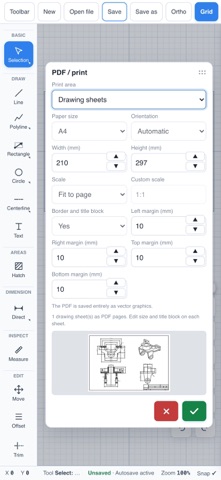
CAD 2D is a drawing app for 2D technical drawings. Create lines, contours, rectangles, circles, arcs and ellipses, add dimensions and export your design as DXF, PNG or vector-based PDF. Draw precisely - Create lines and polylines - Draw rectangles from a corner or from the center - Draw circles, arcs, ellipses and points - Add texts, center lines and center line crosses - Use grids, object snaps and projection aids Create dimensions - Place direct and orthogonal dimensions - Create horizontal, vertical and angular dimensions - Dimension radius and diameter - Set dimensions via edges or snap points - Adjust dimension texts, precision and units Edit geometry - Select and move single or multiple objects - Edit contours with offset, trimming and extending - Create chamfers and curves with preview - Flip objects and arrange them horizontally, vertically or in a circle - Change colors and dimensions later Manage and issue projects - Set up, lock and show or hide layers - Undo or repeat work steps - Save CAD projects, save them under a new name and reload them - Use automatic backups and the integrated drawing review - Export drawings as DXF, PNG or vector-based PDF - Set paper size, orientation, scale, border and title block for PDF and print The interface is designed for touch operation and supports smartphones and tablets in portrait and landscape format. Zooming, moving, snapping points and projection lines help you work precisely on the drawing surface. CAD 2D is suitable for technical sketches, simple constructions, workshop drawings and dimensioned 2D designs.
(描述摘自 App Store 官方页面)
CAD 2D: Drawing & Dimensioning App Store 截图


怎么领取 CAD 2D: Drawing & Dimensioning 的限免
- 在 App Store 中打开 CAD 2D: Drawing & Dimensioning,价格显示为「获取」即仍在限免,点击免费下载。
- 限免期间下载后会计入「已购项目」,之后恢复原价也能免费重新下载或更新。
- 该 App 在国区上架,使用中国大陆 Apple ID 即可领取。


