
VideoBulk
栋 陈 · Utilities
VideoBulk 限免详情
- 限免类型
- 本体限免
- 支持平台
- Mac
- 商店现价
- 免费
- 限免前原价
- $9.99(约 ¥72)
- 国区上架
- 是
- 含内购
- 是
- 安装包
- 626 KB
- 当前版本
- 2.0.0
- 上架时间
- 2024年3月29日
- 分类
- Utilities
- 开发商
- 栋 陈
- 价格校验时间
- 2026年11月26日
限免状态每小时复核一次;若商店已显示收费,说明活动已经结束。
限免记录(1 次)
| 日期 | 类型 | 原价 | 状态 |
|---|---|---|---|
| 2026-11-26 | 本体限免 | $9.99(约 ¥72) | 生效中 |
同一款 App 常会在促销节点反复限免。这里保留了它每次限免的日期与原价, 可以据此判断这次大概会持续多久,也方便等下一次。看 2026-11-26 当天全部限免 →
VideoBulk 应用介绍
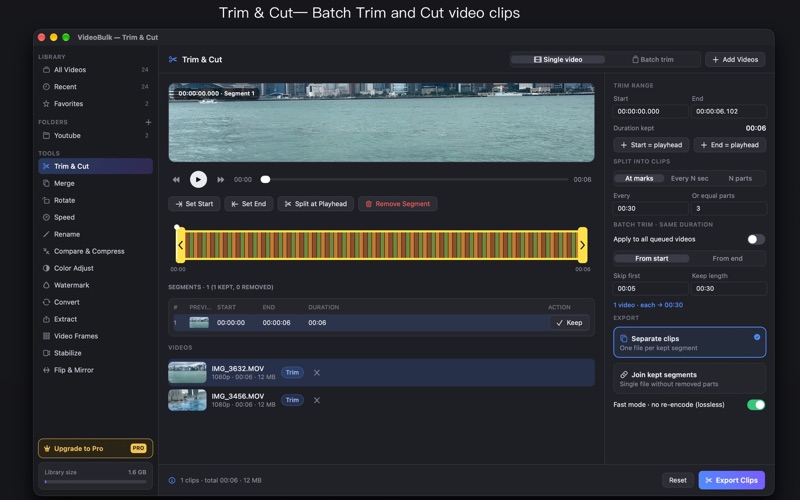
VideoBulk – Batch Video Editor & Manager VideoBulk is a powerful Mac video utility for browsing, organizing, editing, converting, compressing, and managing multiple video files. With a comprehensive collection of video tools, you can easily trim, merge, resize, rename, watermark, and convert videos, extract audio and images, and adjust video colors. #####Video Management##### ----Video Browser: Browse and preview your video clips and folders with an intuitive visual interface. ----Video Organization: Easily manage large collections of video files and navigate between video folders. ----Video Preview: Preview videos before editing, converting, or exporting them. #####Trim & Cut Videos##### ----Interactive Timeline: Set start and end points using draggable handles. Highlight removed sections with a visual timeline indicator. ----Precise Editing: Enter exact start and end times, or use convenient buttons to set positions to the current playhead. ----Flexible Splitting: Split videos at timeline markers, every specified number of seconds, or into a specified number of equal parts. ----Batch Trimming: Apply the same trimming settings to multiple videos. For example, skip the first 5 seconds and keep the next 30 seconds. ----Flexible Export: Export individual clips or join the remaining segments into a single video. ----Fast Export: Use fast mode to export supported video segments without re-encoding, helping preserve the original quality and save processing time. #####Video Editing##### ----Merge Videos: Combine multiple video clips into one video. ----Rotate Videos: Rotate videos to the correct orientation. ----Flip & Mirror: Flip videos horizontally or vertically, with batch processing support. ----Change Video Speed: Create slow-motion or fast-motion videos by adjusting playback speed. ----Video Stabilization: Reduce camera shake in handheld recordings with adjustable stabilization strength. ----Video Frames: Browse video frames, extract individual images, and export or save selected frames. ----Add Watermarks: Add customizable text or image watermarks to video content. #####Color Adjustment##### ----Before & After Preview: Compare original and adjusted videos using a split-screen preview. ----8 Built-in Presets: Quickly apply Original, Vivid, Warm, Cool, Black & White, Vintage, Cinematic, and Fade effects. ----Color Controls: Adjust brightness, contrast, exposure, gamma, saturation, and color temperature. ----Histogram: View a color histogram to help analyze video image levels. ----Custom Presets: Save your favorite color adjustment settings and reuse them in other videos. ----Reset Controls: Easily restore the original color settings. #####Video Compression & Resizing##### ----Video Compression: Compress videos using High, Medium, and Low quality presets. ----Video Resizing: Resize videos to smaller resolutions to reduce storage requirements. ----Batch Compression: Process multiple video files with consistent compression settings. #####Video Conversion##### ----Video Format Conversion: Convert videos into other supported video formats. ----GIF Conversion: Convert video clips into animated GIFs. ----Batch Conversion: Convert multiple videos in one processing session. #####Video Extraction##### ----Extract Audio: Extract audio tracks and save them as separate audio files. ----Extract HD Images: Capture and export high-quality images from video content. ----Batch Extraction: Extract audio and images from multiple videos. #####Batch Video Renaming##### ----Custom Text: Add, remove, or replace text in video filenames. ----Metadata Tags: Rename videos using available metadata information. ----Flexible Naming: Combine custom text and metadata tags to create personalized filename templates. ----Batch Rename: Rename multiple video files at once. Terms of Use (EULA): https://www.apple.com/legal/internet-services/itunes/dev/stdeula/
(描述摘自 Mac App Store 官方页面)
VideoBulk Mac App Store 截图



怎么领取 VideoBulk 的限免
- 在 Mac App Store 中打开 VideoBulk,价格显示为「获取」即仍在限免,点击免费下载。
- 限免期间下载后会计入「已购项目」,之后恢复原价也能免费重新下载或更新。
- 该 App 在国区上架,使用中国大陆 Apple ID 即可领取。
- App 内含付费项目,本体免费不代表全部功能免费。


